Before commissioning a website for a service business, work through one of its offers. Visitors need to recognise their situation, see what the work covers and understand what happens when they click the button. Those answers shape the service page.
We will use apartment cleaning from our cleaning website case study. You can inspect the decisions on the live service page in Ukrainian. We will follow how its sections help visitors assess the service and reach an enquiry.
Start with the customer’s questions
A service page should help someone choose even if they arrive directly and have never read the homepage. Gather the questions your team settles before work begins, then give each answer a suitable place on the page.
| The visitor’s question | What the page should show |
|---|---|
| Does this fit my situation? | The service, format, area covered and typical needs |
| What will the team actually do? | Included work and the limits of the offer |
| How are cost and timing decided? | Estimate factors and the agreement process |
| What can I base my choice on? | Specific terms, available examples and an explanation of the process |
| What should I do next? | A short FAQ and a clear route to an enquiry |
This is a content map, not a fixed number of sections for every business. A brief condition may need only a sentence beside a button; a detailed scope of work is easier to read in its own section.
Name the service and the next step at the top
The cleaning project’s heading immediately identifies apartment cleaning in Zhytomyr. The introduction explains maintenance and deep cleaning, agreeing a checklist and arranging access. Visitors can relate the offer to their property before reading the details.
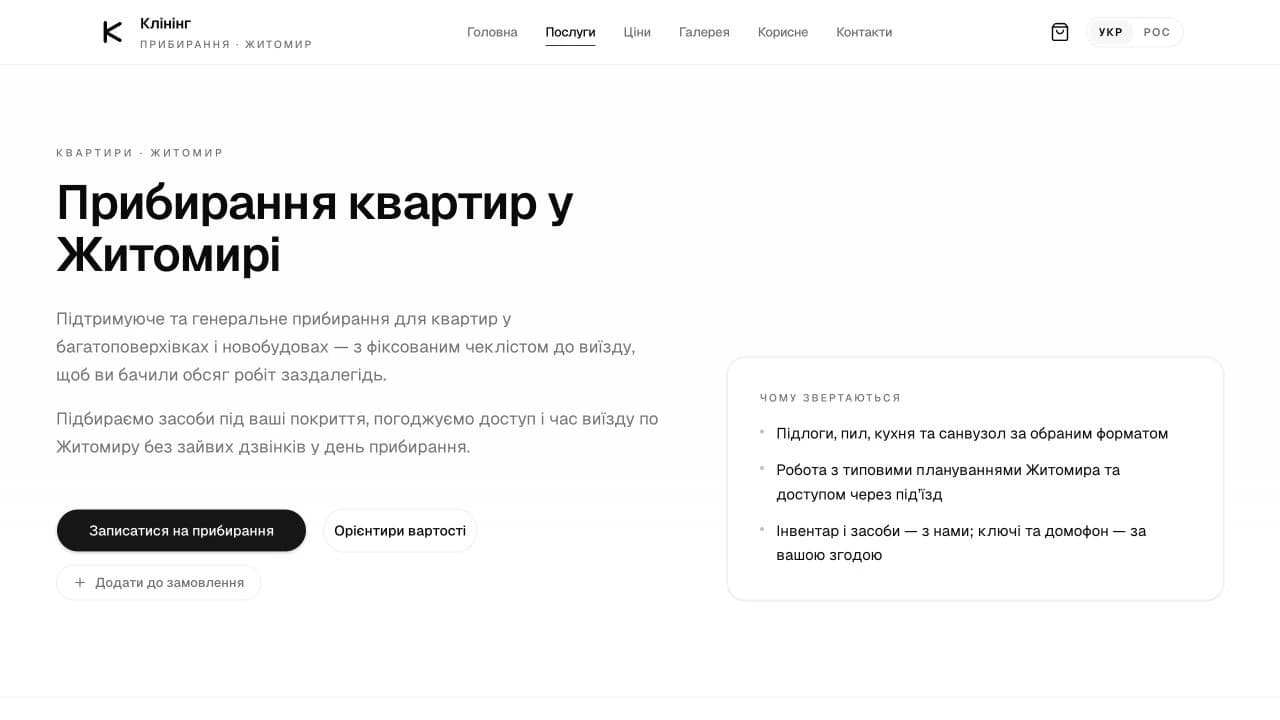
The main link leads to contacts, with a price guidance link beside it. There is also a button to add the service to an order. The right set of actions depends on the company’s actual process: a simple request may need just one enquiry route and a link to the terms.
When commissioning website development, test the opening section against your own offer. What can someone book, who is it for and where does the main button lead? General claims about quality cannot supply those answers.
Show the work included and the terms to agree
The apartment page divides cleaning into rooms and the hallway, the kitchen, the bathroom and additional work by format. It also explains that the final checklist is agreed before the visit. That gives readers a more useful basis for a decision than an unexplained promise of an all-inclusive service.
Put limitations beside the relevant item. For example, the page specifies cleaning the outside of kitchen fronts and agreeing balcony work separately. In another business, the equivalent might be the number of revisions, a delivery area or equipment preparation.
- What the standard scope covers and what the customer receives.
- What depends on the selected format or needs a separate agreement.
- What the customer should prepare before work starts.
- Which limitations matter before making an enquiry.
Publish terms that the team can fulfil. If the checklist changes with the property or task, explain how and when it will be confirmed.
Explain the estimate and the working process
In this example, cost depends on floor area, the cleaning format, the initial condition and additional areas. The page provides starting estimates and a link to pricing; the final amount is clarified after a brief. Readers need to distinguish a guide price from an agreed quote.
Your website can also work without public prices. Explain what affects the calculation and what information the team needs to prepare an estimate. A request for a quote should lead to the relevant enquiry without suggesting an instant fixed price.
The cleaning page describes the steps from a short brief and an agreed checklist to the visit and acceptance of the work. For your own service, describe the actual stages and the customer’s involvement. Where timing depends on scope, explain that dependency alongside it.
Prepare photographs that explain the service
The cleaning page’s opening section shown here has no large photograph: text and concise terms explain the offer. The screenshot in this article demonstrates an interface decision. It does not establish cleaning quality, and an image of a tidy room alone cannot prove who carried out the work.
If you have your own material, select it around customers’ questions. A cleaning company’s photography brief could include:
- A specific completed job: an overall view and a useful detail, with a caption explaining the task.
- A before-and-after pair from the same angle, where both images really show the same property.
- Work in progress or equipment: an image that explains an action instead of merely filling a gallery.
- The team at work, where suitable material and permission to use it are available.
Give each selected image a service, a short context and permission for publication. Remove personal information and private details from view. If you have no original photographs, start by explaining the process; do not label stock imagery as your own completed work.
Build the FAQ around questions before booking
On the inspected apartment page, the FAQ covers maintenance cleaning scope, duration, equipment, price calculation and same-day availability. The questions help visitors continue their choice and clarify the terms.
For your own page, collect questions from everyday customer conversations. Give each a direct answer: a condition, a limitation or the process for agreeing details. If a customer needs to get in touch, explain what information will help the team respond.
| Question topic | What the answer should explain |
|---|---|
| Scope and exclusions | What is included and what needs a separate agreement |
| Preparation | What the customer provides and what the team brings |
| Timing and availability | What affects duration and how the date is confirmed |
| An unusual task | Which details are needed before it can be agreed |
Keep essential limitations in the main description too. An FAQ works well for clarification, but a customer should not need to open every answer to discover the basic terms. Avoid adding questions simply to repeat the service name.
Connect the description to prices, examples and enquiries
The cleaning page links to prices and contacts near the offer, within the cost explanation and at the end. Visitors can also explore other cleaning formats. These links let people continue their choice where a relevant question arises.
For your own site, identify the main action and choose supporting links by context. A work example belongs beside an explanation of experience; a related service helps when it fits a different situation better. Link text should make the destination clear.
Check this route on a phone: can people see the terms, read the lists and reach the enquiry? If you plan to attract customers through search, our guide to SEO during website development covers the wider page structure. This article focuses on the content of one service page.
What to give the developer before commissioning your site
Prepare one service in full before filling every page with the same text. This draft lets you discuss the design using real content and identify missing material.
- The service name, audience, area covered and typical customer situations.
- Core work, optional extras, limitations and preparation.
- How estimates, agreements and delivery work.
- Available photographs or examples with context and usage rights.
- Questions before booking and the team’s actual answers.
- The main action, the contact channel and who handles enquiries.
Use this checklist to discuss a website for your cleaning company. For another sector, we can adapt the page structure as part of business website development. Our guide to commissioning a website explains the collaboration and approval process.
Common questions about service pages
Does a service page have to be long?
No. Its length depends on how much the customer needs to understand. Supply the necessary answers, then remove repetition. The number of sections in the cleaning example is not a target for every service.
Can I have a website built without original photographs?
Yes. Start with a useful description, terms and process. Decide which photographs you will prepare later, and do not present illustrative material as evidence of completed work.
Can a template work for a service page?
Check whether it accommodates your scope, terms, examples and enquiry route. Our comparison of templates and custom websites sets out the decision criteria.
How do I commission a website like this?
Choose your main service and collect the material listed above. Send XEVOR a short project brief so we can discuss the pages, functions and work to include in an estimate.